Introduction
Everyone’s racing toward fully autonomous agents. The vision is compelling: AI that tolerates failure, recovers gracefully, and keeps marching toward its goals. And with 2,000+ MCP servers now in the registry, the tooling ecosystem is exploding.
But here’s what nobody’s talking about: what happens when the LLM doesn’t have all the info it needs to call a tool?
The MCP folks saw this coming. They built something called Elicitation. Most clients don’t support it yet. I built Quick Call with this from day one -> only realized I was ahead of the curve when I found out Claude Code doesn’t support it.
Let me show you what I mean.
The Scenario: “Send hi to Slack”
Same request. Two very different execution paths.
Quick Call (with elicitation)
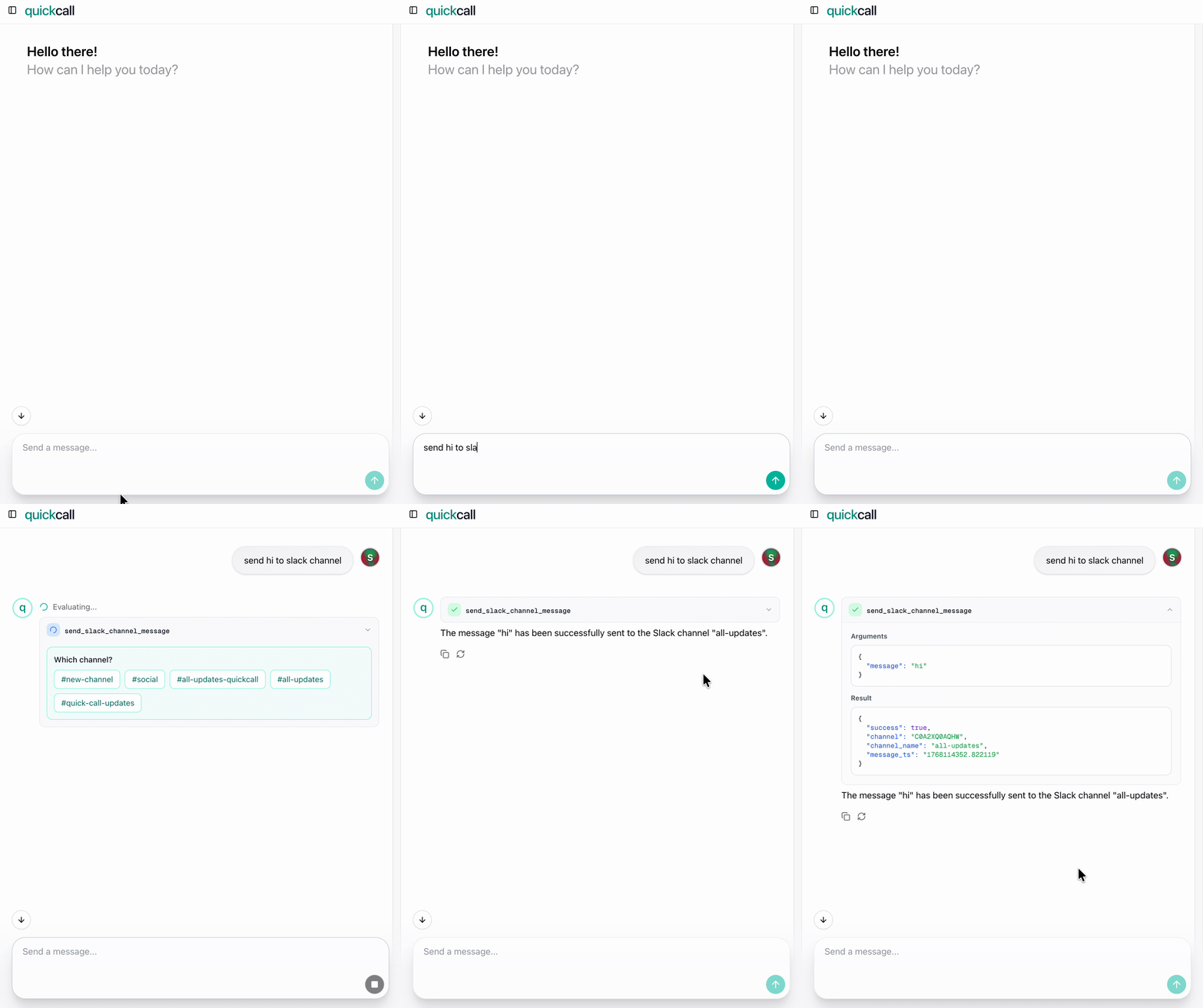
Quick Call: one tool call, user picks channel inline
What happens:
- User: “Send hi to Slack”
- Quick Call MCP server recognizes channel is missing
- Server pauses, shows dropdown: “Which channel?”
- User picks
#general - Message sent
Result: One tool call. One user interaction. Done.
Claude Code (without elicitation)
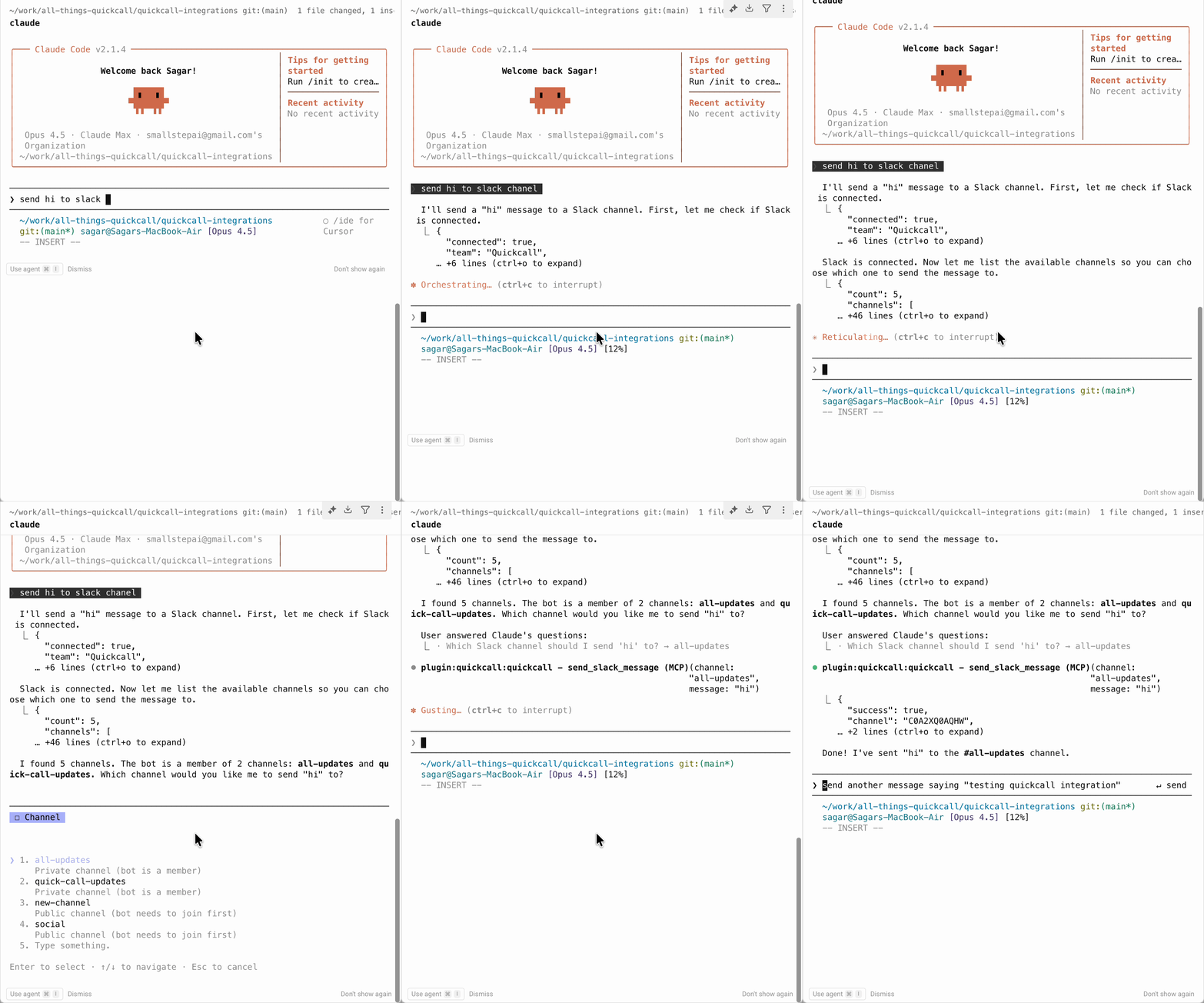
Claude Code: two tool calls, extra round-trip
What happens:
- User: “Send hi to Slack”
- Claude thinks: “I need to know which channel”
- Claude calls
list_channels-> gets channel list back - Claude presents options: “Which channel?”
- User types:
#general - Claude calls
send_message(channel="#general", message="hi") - Done
Result: Two tool calls. Extra tokens. Extra latency.
To be clear: Claude Code is being smart here. It figured out it needed more info and found a workaround. But it’s still a workaround.
The difference? Elicitation lets the tool ask for what it needs. Without it, the LLM has to figure out how to get that info itself.
Think about it: who knows better what parameters a tool needs -> the tool or the LLM guessing from a description? The tool, obviously. Elicitation puts the tool in control of gathering its own inputs. That’s the fundamental shift.
The Cost of Being Clever
Every Extra Tool Call = $$$
The math is simple:
- Each tool call = input tokens (tool definitions) + output tokens (response)
- Extra
list_channelscall: ~500-1000 tokens round-trip - At scale: 1,000 messages/day × 500 tokens = 500K extra tokens/day
What does that cost?
| Model | Input (per 1M) | Output (per 1M) | Daily | Monthly |
|---|---|---|---|---|
| Claude Opus 4.5 | $5 | $25 | ~$5 | ~$150 |
| GPT-4o | $2.50 | $10 | ~$2 | ~$68 |
That’s $70-150/month for one feature’s inefficiency. Multiply by every tool that needs user input.
Beyond Cost: Reliability
Anthropic’s own benchmarks tell the story. From their Opus 4.5 announcement:
Scaled tool use (MCP Atlas):
| Model | Score | Failure Rate |
|---|---|---|
| Opus 4.5 | 62.3% | ~38% |
| Sonnet 4.5 | 43.8% | ~56% |
| Opus 4.1 | 40.9% | ~59% |
Even the best model fails 38% of the time on complex tool use scenarios. And that’s Opus 4.5 -> Anthropic’s flagship. Fewer tool calls = fewer chances to fail.
Latency Adds Up
Each tool call involves:
- Model inference time
- API round-trip
- Response parsing
Claude Code’s workaround means 2x the wait time. The user sits there while the LLM fetches the channel list, processes it, formats the question, waits for input, then makes another call.
With elicitation? The tool pauses, asks, continues. One smooth interaction.
So how do we fix this?
Where Elicitation Shines
Use Cases
| Scenario | Without Elicitation | With Elicitation |
|---|---|---|
| Ambiguity | Fail or guess wrong | Ask: “Which subscription to cancel?” |
| Confirmation | Proceed blindly | Ask: “Type workspace name to confirm delete” |
| Missing params | Extra tool call or error | Ask: “Enter your API key” |
| Progressive input | Front-load everything upfront | Collect step-by-step as needed |
See It In Action
I’ve open-sourced a demo app that showcases Quick Call’s elicitation framework: quickcall-mcp-elicitation
The prompt is deliberately vague: “Schedule a meeting” -> no title, no participants, no time. The tool collects what it needs progressively through elicitation. One tool call, multiple user inputs, zero extra LLM round-trips.
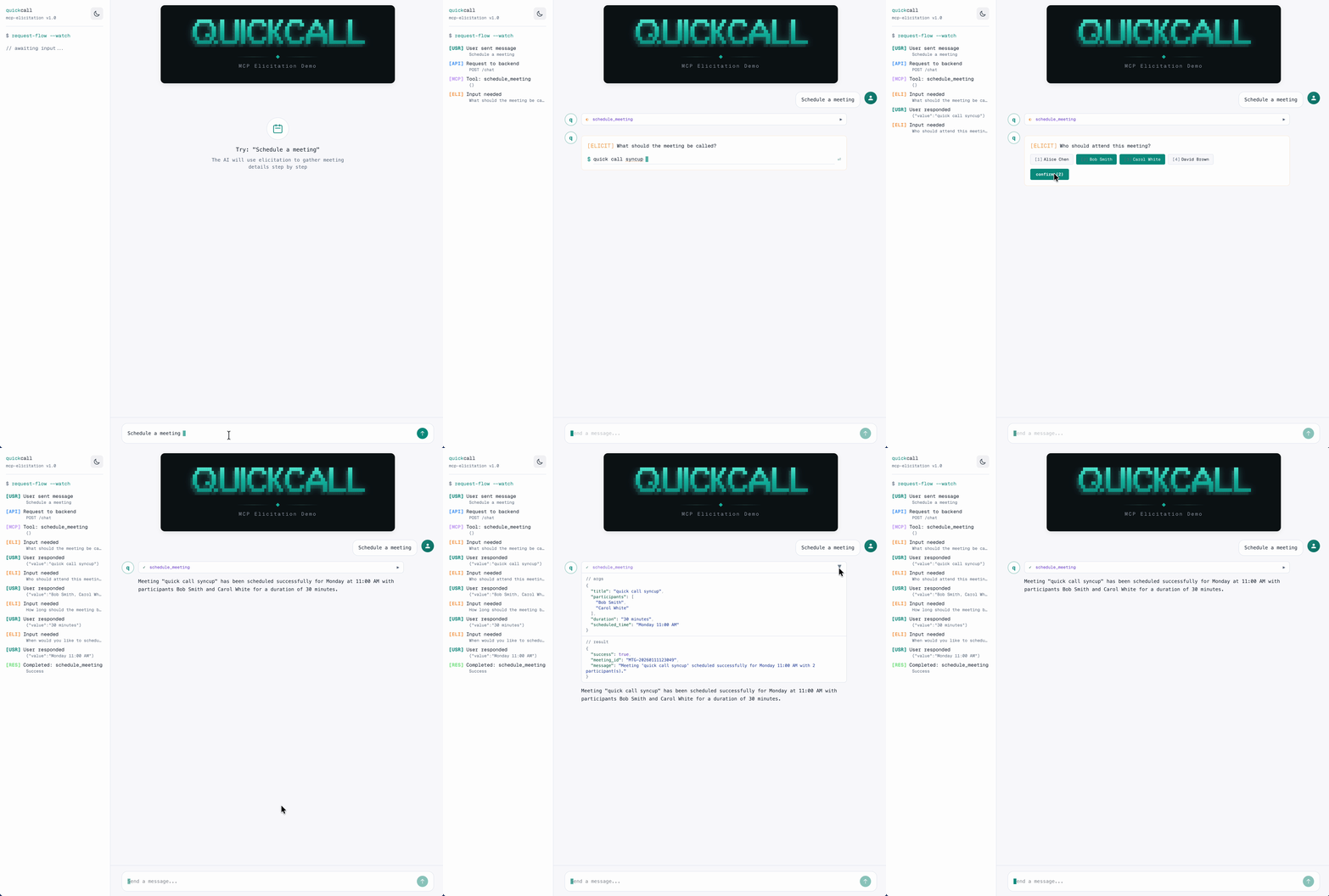
Meeting scheduler with progressive elicitation
Here’s how the flow works:
The tool pauses at each ctx.elicit() call, collects input via SSE, and resumes.
Wait, aren’t those still round-trips?
Each
ctx.elicit()is a round-trip between backend and frontend: SSE event out, user responds, POST back, tool resumes. But critically, it’s not an LLM round-trip. The LLM callsschedule_meetingonce. That single tool execution handles all user interactions internally. The LLM doesn’t re-enter the loop until the tool returns.
How It Works
Server Side: ctx.elicit()
In your MCP tool, call ctx.elicit() when you need user input:
 1from fastmcp.server.dependencies import get_context
 2
 3@mcp.tool()
 4async def schedule_meeting(title: Optional[str] = None, duration: Optional[str] = None):
 5    ctx = get_context()
 6
 7    # Free text input
 8    if not title:
 9        result = await ctx.elicit(
10            message="What should the meeting be called?",
11            response_type=str,
12        )
13        if result.action == "cancel":
14            return {"error": "Cancelled by user"}
15        title = result.data
16
17    # Single select from options
18    if not duration:
19        result = await ctx.elicit(
20            message="How long should the meeting be?",
21            response_type=["30 minutes", "1 hour", "2 hours"],
22        )
23        duration = result.data
24
25    return {"title": title, "duration": duration}
response_type determines the UI:
str-> text input["option1", "option2"]-> single select buttonsint,bool-> appropriate input fields
Client Side: Handle the pause
When ctx.elicit() is called, your client receives an SSE event:
1{
2  "type": "elicitation_request",
3  "elicitation_id": "chat_abc123",
4  "message": "What should the meeting be called?",
5  "options": null
6}
Render the UI, collect input, POST back:
1POST /elicitation/respond
2{
3  "elicitation_id": "chat_abc123",
4  "response": {"action": "accept", "value": "Weekly Standup"}
5}
The tool resumes from where it paused. That’s it.
Current Client Support
| Client | Elicitation | Notes |
|---|---|---|
| Claude Code | No | Issue #2799 - 106 upvotes, assigned but no timeline |
| Quick Call | Yes | Built-in from day one |
| GitHub Copilot | Yes | Shipped Dec 2025 - VS Code, VS 2026, JetBrains |
| Cursor | Yes | Shipped - supports string, number, boolean, enum schemas |
When I built Quick Call, elicitation was already available in FastMCP. I used it because making users re-prompt when a parameter was missing felt wrong. I’m looking forward to seeing Claude Code support this.
Final Thoughts
Elicitation isn’t UX polish. It’s the difference between tools that ask for what they need and LLMs that scramble to figure it out themselves.
Fewer tool calls. Fewer tokens. Fewer failures. Better UX.
Cursor and Copilot already support it. Claude Code will get there. Until then, build your tools right -> assume elicitation exists, and let your tools do the asking.
The MCP elicitation demo is open-sourced: quickcall-mcp-elicitation
Try Quick Call: Now with Claude Code integration -> quickcall.dev/claude-code
Catch up: Part 1: What the MCP? | Part 2: I Built Quick Call
Resources
- MCP Elicitation Docs
- Claude Opus 4.5 Announcement & Benchmarks
- Quick Call MCP Elicitation Demo
- Claude Code Elicitation Feature Request (Issue #2799)
- GitHub Copilot MCP Elicitation in JetBrains
- Cursor MCP Elicitation Support
- Part 1: What the MCP?
- Part 2: I Built Quick Call